I love the fact that libraries are creating tutorial videos on research techniques.
This is a video from Virginia Commonwealth University Libraries on how to use Boolean Operators. You can use these in Ask.com, Bing and Google. Operators can help you target the materials you need in a search.
For more library tutorial videos check out the VCU Libraries YouTube channel.
Tampilkan postingan dengan label search tools. Tampilkan semua postingan
Tampilkan postingan dengan label search tools. Tampilkan semua postingan
Selasa, 28 Desember 2010

Jumat, 05 November 2010
Bloglines Transfering Ownership to Merchant Circle
I received an e-mail from Bloglines/Ask.com informing me that they are transferring Bloglines to new owners MerchantCircle.com.
Per the Bloglines/Ask.com e-mail:
I am really not clear on how this is going to be a good match. The general focus of MerchantCircle is to attract small business owners to help them connect with customers. Nothing wrong with that; support your local businesses when possible.
I have to be honest. When I did use Bloglines it was not to shop. It was to connect with those sites and blogs I needed to track or visit. I'm not totally opposed to ads that support a web business. I'm just not sure how these two different kinds of web services are going to mesh with each other.
My main concern is that I don't want my contact info transferred to vendors without my explicit permission. If I don't like it I want an easy Opt-Out process.
For more info you can visit the MerchantCircle blog or e-mail your questions.
Per the Bloglines/Ask.com e-mail:
- Ask.com will maintain the current Bloglines service as is until December 1, 2010. After December 1, 2010, the service will transition wholly to MerchantCircle. During the month of December, you will be able to easily port your feeds over to the MerchantCircle-powered service. It's an easy process, and we.ll provide you with complete instructions well in advance.
- Logging-In: You will keep your same password as before.
- Current Bloglines features: Your Bloglines subscriptions will seamlessly transition to the MerchantCircle service, however, the Clippings Tab will no longer be available and you will not be able to transport saved articles to the new service. We're very sorry for any inconvenience this will cause; the infrastructure requirements and costs are simply too great to justify maintaining this type of archiving feature.
I am really not clear on how this is going to be a good match. The general focus of MerchantCircle is to attract small business owners to help them connect with customers. Nothing wrong with that; support your local businesses when possible.
I have to be honest. When I did use Bloglines it was not to shop. It was to connect with those sites and blogs I needed to track or visit. I'm not totally opposed to ads that support a web business. I'm just not sure how these two different kinds of web services are going to mesh with each other.
My main concern is that I don't want my contact info transferred to vendors without my explicit permission. If I don't like it I want an easy Opt-Out process.
For more info you can visit the MerchantCircle blog or e-mail your questions.
Minggu, 12 September 2010
Bloglines Shutting Down on October 1, 2010
Just found out that Ask.com is closing Bloglines on October 1, 2010. This means if you have a bunch of RSS feed links stored in Bloglines you need to find them a new home.
If you have an account you need to export your feeds quick, fast and in a hurry. The instructions are on the front page of the Bloglines website.
 I know that many people used Bloglines access multiple web locations no matter where they were or what machine that they were using. I certainly used Bloglines for class related sites and to track various types of information. It was very helpful.
If you have a Google account you can import your Bloglines feeds into Google Reader. This way you can continue to access and track websites from home, work or school.
My problem with using Google Reader is that I don't want all of my RSS feeds in the same place. I have entertainment links, educational and research links that shouldn't be intermingled.
Desktop Readers:
Windows users might want to consider installing Feed Demon and Mac iPhone, iPad and desktop users may want to swing over to installing Net News Wire.
E-Mail RSS Readers:
Your e-mail program may have a News and Groups/RSS reader function. I use Thunderbird as my e-mail program and a supplemental RSS reader. Microsoft Outlook and other e-mail programs have similar functions.
The only problem is accessibility away from your primary computer.
Twitter and Facebook
Yes, this is an option if the website or blog faithfully announces new posts in their feeds. Not all do. And strange as it may seem not everyone has a Twitter or Facebook account.
You really should have some kind of link management or tracking system as long as it supports your online experience and your research needs.
If you have an account you need to export your feeds quick, fast and in a hurry. The instructions are on the front page of the Bloglines website.
I know that many people used Bloglines access multiple web locations no matter where they were or what machine that they were using. I certainly used Bloglines for class related sites and to track various types of information. It was very helpful.Alternatives to Bloglines
If you have a Google account you can import your Bloglines feeds into Google Reader. This way you can continue to access and track websites from home, work or school.
My problem with using Google Reader is that I don't want all of my RSS feeds in the same place. I have entertainment links, educational and research links that shouldn't be intermingled.
Desktop Readers:
Windows users might want to consider installing Feed Demon and Mac iPhone, iPad and desktop users may want to swing over to installing Net News Wire.
E-Mail RSS Readers:
Your e-mail program may have a News and Groups/RSS reader function. I use Thunderbird as my e-mail program and a supplemental RSS reader. Microsoft Outlook and other e-mail programs have similar functions.
The only problem is accessibility away from your primary computer.
Twitter and Facebook
Yes, this is an option if the website or blog faithfully announces new posts in their feeds. Not all do. And strange as it may seem not everyone has a Twitter or Facebook account.
You really should have some kind of link management or tracking system as long as it supports your online experience and your research needs.
Jumat, 27 November 2009
This We Know - Viewing Statistics from Data.gov
There is a tremendous amount of information provided to American citizens. For all of the questions being asked about governmental data the answers are not always easy to find.

This We Know is not a government site but is does display governmental data. The website collects information from www.data.gov and presents it in a format that is accessible.
For example, by typing in the zip code of 91106 I quickly found out that:
At least, I hope so.
But if you like your data raw, massive and plum overwhelming there is nothing like going to the source, in this case the Data.gov Tools page:
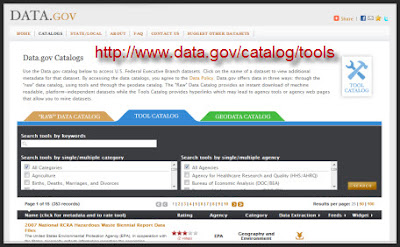 On the Tools page is a gateway catalog of the hundreds of governmental websites providing statistical information, information resources and government resources.
You can search by category or by governmental agency. There is a lot of data here. Use what you can, it is for the taking.
This We Know is not a government site but is does display governmental data. The website collects information from www.data.gov and presents it in a format that is accessible.
For example, by typing in the zip code of 91106 I quickly found out that:
- How much pollutants were release in the air and by which companies within the zip code.
- How many people are unemployed in Pasadena, CA.
- How many factories are in the area.
At least, I hope so.
But if you like your data raw, massive and plum overwhelming there is nothing like going to the source, in this case the Data.gov Tools page:
On the Tools page is a gateway catalog of the hundreds of governmental websites providing statistical information, information resources and government resources.You can search by category or by governmental agency. There is a lot of data here. Use what you can, it is for the taking.
Selasa, 29 September 2009
ProQuest Example Video from Mike Johnson
Mike Johnson is an Assistant Librarian at Bloomquest College in New Jersey. He created an easy to understand demonstration video on using ProQuest to find a specific topic in a specific journal article.
Mike is using a free online program called ScreenToaster. One of the features of that service is that it makes it easier to add subtitles and captions to videos.
Anyway, this is a really clear, quick instruction on how to get the most of ProQuest.
Mike is using a free online program called ScreenToaster. One of the features of that service is that it makes it easier to add subtitles and captions to videos.
Anyway, this is a really clear, quick instruction on how to get the most of ProQuest.
Senin, 17 Agustus 2009
Collecta - Real Time Search of Blogs, Tweets and Videos
Collecta searches in real time for your topic. It includes Blogs and Twitter text into your search.
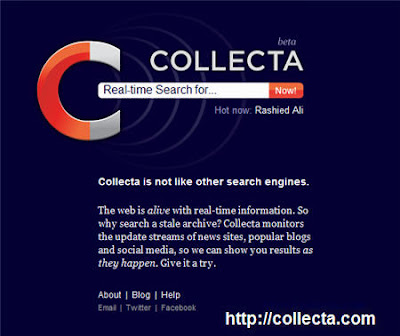
Collecta will continue to look for your topic until you tell it to stop by deselecting the search box. I didn't understand why it kept updating the search after I finished it or went on to another topic. It was like the little engine that could.

The Preview panel allows you to see the content and you can click to visit the source. Here is the neat part; under search options you see the following:
 Searching for comments is interesting because I have found good links and resources that way. I also like the video search aspect but I would like to choose different video distribution sources like Daily Motion, Blip.tv and other similar sites.
This Is A Keeper
Collecta is still in Beta so when I performed a search on "library classification systems" I got results from programing languages, game players terminology and other not obvious classification connections, in addition to library blogs.
Currently there is no way that I could find to restrict the search area; for example I can't tell Collecta to search only Wordpress blogs or only blogs that have "library" in the title.
At this point I think this is a good alternative for Google Blog Search and it can be used as a supplement to other search engines.
Collecta will continue to look for your topic until you tell it to stop by deselecting the search box. I didn't understand why it kept updating the search after I finished it or went on to another topic. It was like the little engine that could.
The Preview panel allows you to see the content and you can click to visit the source. Here is the neat part; under search options you see the following:
Searching for comments is interesting because I have found good links and resources that way. I also like the video search aspect but I would like to choose different video distribution sources like Daily Motion, Blip.tv and other similar sites.This Is A Keeper
Collecta is still in Beta so when I performed a search on "library classification systems" I got results from programing languages, game players terminology and other not obvious classification connections, in addition to library blogs.
Currently there is no way that I could find to restrict the search area; for example I can't tell Collecta to search only Wordpress blogs or only blogs that have "library" in the title.
At this point I think this is a good alternative for Google Blog Search and it can be used as a supplement to other search engines.
Jumat, 15 Mei 2009
Science.Gov Portal To U.S. Science Information
I found out about this via the ALA Federal Library and Armed Forces Library Roundtable ListServ. Science.gov is a portal to various governmental databases and technical information sites. It might make it a little easier to locate governmental authoritative sources.
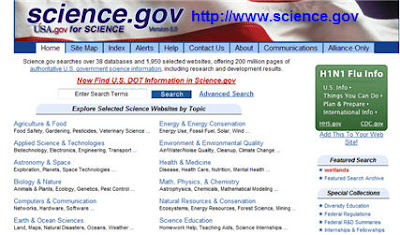 I looked under the category of Science Education. There are links to sources from the Library of Congress, National Science Foundations, NASA and so many more agencies that have science data.
You can enter a search term or you can use the advanced search to find by keyword, title or to select just the area you want to discover.
Science.gov is a great help in finding data but I do want to mention a concern. I followed a group of links about chemistry clip art from the Food and Drug Administration. Many of the links were dead or long gone.
Not blaming the FDA for this, external websites change all the time. Part of the responsibility is trying to maintain quality links so you do have to go back and see if a source listed in 1999 is still viable in 2009.
Science.gov is a cool resource that can help you locate governmental science related materials. I'll spend a little more time checking it out.
I looked under the category of Science Education. There are links to sources from the Library of Congress, National Science Foundations, NASA and so many more agencies that have science data.You can enter a search term or you can use the advanced search to find by keyword, title or to select just the area you want to discover.
Science.gov is a great help in finding data but I do want to mention a concern. I followed a group of links about chemistry clip art from the Food and Drug Administration. Many of the links were dead or long gone.
Not blaming the FDA for this, external websites change all the time. Part of the responsibility is trying to maintain quality links so you do have to go back and see if a source listed in 1999 is still viable in 2009.
Science.gov is a cool resource that can help you locate governmental science related materials. I'll spend a little more time checking it out.
Jumat, 26 Desember 2008
Biographical Directory of the United States Congress
The United States Congress has an easy way for you to obtain historical and biographical information on the men and women who serve in Congress.
The Biographical Directory of the United States Congress can help students and historical researchers get information quickly and without a lot of trouble.

The Biographic Directory can be searched by the name of the congress member, the party, state or year of service.
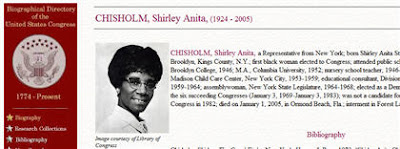
You will see a photo or illustration of the congressperson and a historical record of their education, prior employment held before becoming a member of Congress, party affiliations and notable achievements.
The database contains records from 1774 to the present time so you should be able to find anyone who has served in the House or the Senate.
The Biographical Directory of the United States Congress can help students and historical researchers get information quickly and without a lot of trouble.
The Biographic Directory can be searched by the name of the congress member, the party, state or year of service.
You will see a photo or illustration of the congressperson and a historical record of their education, prior employment held before becoming a member of Congress, party affiliations and notable achievements.
The database contains records from 1774 to the present time so you should be able to find anyone who has served in the House or the Senate.
Selasa, 11 November 2008
Improve Your Searches Using Google Features
You type in the Google search box and hope for the best. Tsk, tsk. There is so much more you can do to refine your search results and save yourself a bit of time. So let's take a quick look at library specific feature that will help you get the most from your Google experience.
 Search Box Quickies
These are some of the things you can do to get your answer quickly without having to find a specific web site. There are many tools that can help you survive the Ready Reference desk whammo of the day. This is just a sample:
Those of you who will be sitting at the Ready Reference desk will absolutely want to embed these skills to memory.
Search Box QuickiesThese are some of the things you can do to get your answer quickly without having to find a specific web site. There are many tools that can help you survive the Ready Reference desk whammo of the day. This is just a sample:
- To get a definition of a word type define, press the space bar and then your word.
- Use it as a calculator, if you know basic math just type in the formula and press search. Your answer will appear before your eyes.
- To find a restaurant in a certain zip code type the kind of food, press the space bar and then the zip code. Google will show you a list of the area restaurants with a map, the name of the restaurant and their web site. You might think it is important but I have people asking me all the time where can I go for a taste of Yak.
Those of you who will be sitting at the Ready Reference desk will absolutely want to embed these skills to memory.
Minggu, 26 Oktober 2008
More Info Book Media Tools - Library 101
If you intend to be a library worker you need to know how to view, download and save an electronic text files, Adobe .pdf files or how to find and listen to an audio recordings.
Hey, I'm In It For the Books. Why Do I Need To Know This Stuff?
Define "book?" This is not a trick question. Traditionally there was a physical, tangible object made of paper and ink called a book. It was and is a delivery device used to convey ideas, stories, methods and instructions. A mighty fine delivery device.
However, it is not the only way to deliver content. A book can now be:
Or, you are asked to find an audio copy of Jane Austen's "Sense and Sensibility" Can you find a legal public domain version in the mp3 format? Could you also find other audio versions performed by professional actors that the patron might want to know about?
To Get You Started:
Try the recommended links and view the web sites. Now if you do this at a public library or even at PCC there may be restrictions on what you can view, download or save to an alternate device.
Some libraries will allow you to save to a USB drive but not to the computer's hard drive. Other will temporarily allow downloading to the computer's hard drive but the user needs to know how to transfer to the USB drive. Ask the staff or read the computer lab policy first.
When searching remember, it is not just about Google. Try Ask.com, Hakia and SearchMe.
Hey, I'm In It For the Books. Why Do I Need To Know This Stuff?
Define "book?" This is not a trick question. Traditionally there was a physical, tangible object made of paper and ink called a book. It was and is a delivery device used to convey ideas, stories, methods and instructions. A mighty fine delivery device.
However, it is not the only way to deliver content. A book can now be:
- An electronic text file that can be read on-line or through a e-book reader and some media players. For example, if you wanted to read a book in the text format you could visit Project Gutenberg to search, download and read books that are in the Public Domain.
- In the Adobe Portable Document Format (.pdf) that can represent book-like feature but allows you to search, annotate and electronically highlight sections. .pdf files are printer friendly and can be sent via e-mail, downloadable via the Internet or compose your own book for distribution. Planet PDF has free books for download such as Anna Karenina, A Tale of Two Cities and Beyond Good and Evil.
- An audio file book can be delivered via vinyl records, cassettes, proprietary audio formats (Audible.com) or in computer audio formats such as .mp3, FLAC, .wav, aiff and other electronic audio fomats. Computer audio formats can be listened to on-line, played back on certain CD/DVD players or from a media players such as Apple's iPod/iTouch, Windows Zune, Creative's Zen and many more. One place to find free audio books is LibriVox. I can personally vouch for The Prisoner of Zenda.
Or, you are asked to find an audio copy of Jane Austen's "Sense and Sensibility" Can you find a legal public domain version in the mp3 format? Could you also find other audio versions performed by professional actors that the patron might want to know about?
To Get You Started:
Try the recommended links and view the web sites. Now if you do this at a public library or even at PCC there may be restrictions on what you can view, download or save to an alternate device.
Some libraries will allow you to save to a USB drive but not to the computer's hard drive. Other will temporarily allow downloading to the computer's hard drive but the user needs to know how to transfer to the USB drive. Ask the staff or read the computer lab policy first.
When searching remember, it is not just about Google. Try Ask.com, Hakia and SearchMe.
Rabu, 22 Oktober 2008
RSS In Plain English - Captioned Version
For those of you that don't have audio, headphone or a decent audio card this is a captioned version of RSS in Plain English.
What that you say, you have a banana in your ear and still can't see the video. No problem. Here is a transcript:
For more captioned videos you should visit DotSub
What that you say, you have a banana in your ear and still can't see the video. No problem. Here is a transcript:
Common Craft Presents...RSS in Plain English
The Internet has problems. Technorati says there are 50 million blogs, and you can see, it's going up. This is overwhelming. Today's show is about a new and efficient way to keep up...
...with all this cool stuff that's happening on the Internet.
so I'm going to talk about two ways that you can keep up with what's happening on the Web.
There's the old slow way - Boo!!! Then, there's the new and fast way - Yay!
Here's the difference between the new and the old way. This is you, and here are your favorite websites. You log on to your computer, and you're looking for something new. So you go out to your favorite blogs.Is there anything new there? No. You go out to your favorite news sites. Is there anything new? No.
Every time you look for something new and its not there, you've wasted valuable time.
This is the old way. Now, let's consider the new and fast way, ...which is simply taking these arrows...and turning them the other way.
This means the new things from blogs and new things from your news sites come to you instead.
It's like Netflix compared to going to the video store. So, what we're talking about is using a single website that becomes your home for reading......all the new stuff that's coming from your favorite websites.
There are two steps to getting started. The first step is you need a "home" for reading new posts. This is a website called a reader. It is free and all you need is an account. I use a site called Google Reader It looks like this...
My favorite sites are listed on the left...and on the right I can scroll through all the new posts from my favorite sites in a single place. So, to complete step one...
You need to go sign up for a reader. Google Reader, Bloglines, Newsgator and My Yahoo!
... are good places to start.
Step number two...is to set up a connection between your reader and your favorite websites.
Setting up these connections is called subscribing, and it's really important. Nearly every blog and news site offers the ability for you to subscribe...so updates in these sites show up here in your reader.
To set up these subscriptions, you just need to look for funny little icons. This is the standard one using the standard orange color. You may also see these.
These little icons say, "Hey look! Subscribe to me! I can save you time!" Once you find one of these buttons on your favorite site......click on it....and the page that appears will give you everything you need for subscribing.
After you click that button, one of two types of pages will appear. This is one that provides one click access to subscribing in your reader. The other page you're likely to see looks like this...
...with code on it.
If you see this page, copy the URL at the top of the page....go to your reader and look for a link that says "Add Subscription" or "Add Feed." Click on that, and paste the address into your reader. So, once you've added your subscriptions and the connection is there...
...new posts begin arriving in your reader...and you'll see why this is the new, faster way to read the web. It's addictive, so be careful!
So a quick recap. There are two things you need to do... Number one is go sign up for a reader.
Number two, go to your favorite websites... ...click on the icon and subscribe.
I'm Lee LeFever and this has been RSS in Plain English...on The Common Craft Show.
The Internet has problems. Technorati says there are 50 million blogs, and you can see, it's going up. This is overwhelming. Today's show is about a new and efficient way to keep up...
...with all this cool stuff that's happening on the Internet.
so I'm going to talk about two ways that you can keep up with what's happening on the Web.
There's the old slow way - Boo!!! Then, there's the new and fast way - Yay!
Here's the difference between the new and the old way. This is you, and here are your favorite websites. You log on to your computer, and you're looking for something new. So you go out to your favorite blogs.Is there anything new there? No. You go out to your favorite news sites. Is there anything new? No.
Every time you look for something new and its not there, you've wasted valuable time.
This is the old way. Now, let's consider the new and fast way, ...which is simply taking these arrows...and turning them the other way.
This means the new things from blogs and new things from your news sites come to you instead.
It's like Netflix compared to going to the video store. So, what we're talking about is using a single website that becomes your home for reading......all the new stuff that's coming from your favorite websites.
There are two steps to getting started. The first step is you need a "home" for reading new posts. This is a website called a reader. It is free and all you need is an account. I use a site called Google Reader It looks like this...
My favorite sites are listed on the left...and on the right I can scroll through all the new posts from my favorite sites in a single place. So, to complete step one...
You need to go sign up for a reader. Google Reader, Bloglines, Newsgator and My Yahoo!
... are good places to start.
Step number two...is to set up a connection between your reader and your favorite websites.
Setting up these connections is called subscribing, and it's really important. Nearly every blog and news site offers the ability for you to subscribe...so updates in these sites show up here in your reader.
To set up these subscriptions, you just need to look for funny little icons. This is the standard one using the standard orange color. You may also see these.
These little icons say, "Hey look! Subscribe to me! I can save you time!" Once you find one of these buttons on your favorite site......click on it....and the page that appears will give you everything you need for subscribing.
After you click that button, one of two types of pages will appear. This is one that provides one click access to subscribing in your reader. The other page you're likely to see looks like this...
...with code on it.
If you see this page, copy the URL at the top of the page....go to your reader and look for a link that says "Add Subscription" or "Add Feed." Click on that, and paste the address into your reader. So, once you've added your subscriptions and the connection is there...
...new posts begin arriving in your reader...and you'll see why this is the new, faster way to read the web. It's addictive, so be careful!
So a quick recap. There are two things you need to do... Number one is go sign up for a reader.
Number two, go to your favorite websites... ...click on the icon and subscribe.
I'm Lee LeFever and this has been RSS in Plain English...on The Common Craft Show.
For more captioned videos you should visit DotSub
Selasa, 07 Oktober 2008
Web Search Strategies In Plain English - Subtitled
This is another winner from the good folks at Common Craft. This video explains basic web search strategies and short cuts on how to find what you need from web search engines. This is the open captioned English version from DotSub.
DotSub is a web based tool that allows video creators to add subtitles to videos in almost any language. There are hundreds of subtitled videos on the site and more being added everyday.
DotSub is a web based tool that allows video creators to add subtitles to videos in almost any language. There are hundreds of subtitled videos on the site and more being added everyday.
Minggu, 14 September 2008
MeritAid - Scholarship Money Made Easier to Find
There are billions of dollars in scholarship money available. The problem is accessing legitimate places to find those scholarships that are looking for you. I'm testing out a new service called MeritAid.

On the Internet you do have to be careful, there are a lot of flim-flam operations and rip-offs about finding scholarship information. What MeritAid does is gather your information and find schools that match up to your interests.
In addition they will also show you a list of the schools in a certain geographical area that you might be interested in attending. By clicking on the name of the school you can see how much it cost to attend, the acceptance rate and the amount of aid the school could supply.

In addition, you can see if there is funding for freshmen, sophomore, transfer or graduate students. You can filter the result to show just those scholarship that apply to your situation.

In this example from UCLA there is the Blue and Gold scholarship and the UCLA Regents scholarship that is available for transfer students. You do have to register with the site. There is also a place for you to set up your profile so that the more details that you provide the better the potential match between you and the institution.
This is a relatively new service, it is still in Beta but for those of you looking to go on to Library School or to continue your education elsewhere this is an effective way to find out if you can afford the school and if you can obtain scholarship or grant based assistance.
As always you should read the terms of service. The site will share your information with schools but it states that it will not personally identify you. You will also have the option of declining invitations from schools that would like you to attend there place of learning.
I have no desire in going into debt to complete my education. That may not be realistic but it is my primary goal for now. I will continue to evaluate if this site can help me locate a school that I can afford and has the ability to assist me without the use of student loans. I'll keep you posted.
On the Internet you do have to be careful, there are a lot of flim-flam operations and rip-offs about finding scholarship information. What MeritAid does is gather your information and find schools that match up to your interests.
In addition they will also show you a list of the schools in a certain geographical area that you might be interested in attending. By clicking on the name of the school you can see how much it cost to attend, the acceptance rate and the amount of aid the school could supply.
In addition, you can see if there is funding for freshmen, sophomore, transfer or graduate students. You can filter the result to show just those scholarship that apply to your situation.
In this example from UCLA there is the Blue and Gold scholarship and the UCLA Regents scholarship that is available for transfer students. You do have to register with the site. There is also a place for you to set up your profile so that the more details that you provide the better the potential match between you and the institution.
This is a relatively new service, it is still in Beta but for those of you looking to go on to Library School or to continue your education elsewhere this is an effective way to find out if you can afford the school and if you can obtain scholarship or grant based assistance.
As always you should read the terms of service. The site will share your information with schools but it states that it will not personally identify you. You will also have the option of declining invitations from schools that would like you to attend there place of learning.
I have no desire in going into debt to complete my education. That may not be realistic but it is my primary goal for now. I will continue to evaluate if this site can help me locate a school that I can afford and has the ability to assist me without the use of student loans. I'll keep you posted.
Sabtu, 02 Agustus 2008
Cuil - New Seach Engine on the Block
It ain't easy being the new kid in town. The cool kids can't see you for who you are. The snobs know everything and have no use for you. But Cuil, I think you got potential.
Cuil is a new search engine. It is pronounced "cool". I like some of the features of Cuil and I want to show you what it can and sometimes can't do.
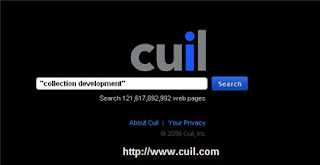
First off, let's not compare it to Google. I think it has more in common with Ask.com which is a dang good search engine. I type the term "collection development" Cuil gives me the following screen:
 You have the option of a two column or three column layout and the items matching your search term appear on the screen. On the upper right side is the explore by category menu.
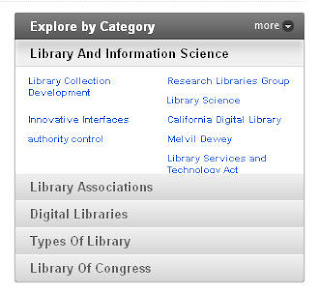 It will bring up additional categories. By clicking on the gray bar it will give you related terms you can use to search with your initial search term.
I like this for a good and bad reason. I can get more specific by telling Cuil I want to know more about library collection development. But if I want to stray of and dive into something new I can do that too.
I mentioned that Cuil is more similar to Ask.com and I want to show you what I mean:

Comparing it to Ask.com
Ask.com also has a feature to narrow your search but it is a little more focused. It understood that I was looking for library collection development, offered to show examples or links to planning, tools and practices.
Ask.com is not perfect. You have to know that there are sponsored links above and below your actual search results. Some of the links provided even under the stated categories are out of place or relate to other industries that also use the term collection development.
I like the concept of having suggestions to narrow the search term and I think Cuil is on to something. Having multiple categories to choose from can lead you down many interesting roads.
Small Caution and Safe Searching
As I was going through the links I noticed that some seem to repeat themselves. I looked down at the URLs listing and finally figured out the problem. Blog spoofers, spammers and other forms of low life are stealing content and linking it to their websites or blogs. Why would a seller of baby products wrap itself around the term collection development is beyond me.
This is not Cuil's fault. It is an on-going problem with all search engines. Be extra cautious about automatically clicking on a link. Read the sample text, many times the crum bums can't spell or there is non-sense text. Look at the URL before you click and practice safe surfing.
I'm not just saying this about Cuil. You have to be attentive with all search engines.
Is It Worth It?
Yeah, I think it is worth a tryout. When I refined my search to library collection development Cuil pulled up links from university and professional associations. It also presented books containing collection development content.
It was fast and I liked that it was more of a visual experience. I think you should add it to your reference tool kit for a test drive.
Cuil is a new search engine. It is pronounced "cool". I like some of the features of Cuil and I want to show you what it can and sometimes can't do.
First off, let's not compare it to Google. I think it has more in common with Ask.com which is a dang good search engine. I type the term "collection development" Cuil gives me the following screen:
You have the option of a two column or three column layout and the items matching your search term appear on the screen. On the upper right side is the explore by category menu. It will bring up additional categories. By clicking on the gray bar it will give you related terms you can use to search with your initial search term.
I like this for a good and bad reason. I can get more specific by telling Cuil I want to know more about library collection development. But if I want to stray of and dive into something new I can do that too.
I mentioned that Cuil is more similar to Ask.com and I want to show you what I mean:
Comparing it to Ask.com
Ask.com also has a feature to narrow your search but it is a little more focused. It understood that I was looking for library collection development, offered to show examples or links to planning, tools and practices.
Ask.com is not perfect. You have to know that there are sponsored links above and below your actual search results. Some of the links provided even under the stated categories are out of place or relate to other industries that also use the term collection development.
I like the concept of having suggestions to narrow the search term and I think Cuil is on to something. Having multiple categories to choose from can lead you down many interesting roads.
Small Caution and Safe Searching
As I was going through the links I noticed that some seem to repeat themselves. I looked down at the URLs listing and finally figured out the problem. Blog spoofers, spammers and other forms of low life are stealing content and linking it to their websites or blogs. Why would a seller of baby products wrap itself around the term collection development is beyond me.
This is not Cuil's fault. It is an on-going problem with all search engines. Be extra cautious about automatically clicking on a link. Read the sample text, many times the crum bums can't spell or there is non-sense text. Look at the URL before you click and practice safe surfing.
I'm not just saying this about Cuil. You have to be attentive with all search engines.
Is It Worth It?
Yeah, I think it is worth a tryout. When I refined my search to library collection development Cuil pulled up links from university and professional associations. It also presented books containing collection development content.
It was fast and I liked that it was more of a visual experience. I think you should add it to your reference tool kit for a test drive.
Senin, 12 Mei 2008
Zotero - Reference Manager for Your Browser
Oh the joy, the rapture. I would have paid for it if I had know where to find it. Zotero, where have you been all my life? I learned about this little beauty from the InfoLit ListServ and I have plugged it in for immediate use.

Zotero is a reference manager add-in for Firefox, Netscape and Flock browsers. Yes, you Microsoft Internet Explorer folks are temporarily locked out of this goody. You add the plug in to your browser and then re-start.
You will be able to cite all kinds of material from just about anyway you travel on or off the Net. Books from WorldCat, MP3 and podcast, presentations, webcasts, journals, articles and more. You can copy and past your reference notes and export what you need as a RTF, HTML or even paper format. It is the merger of the best of the old reference techniques and new information management in one package.
All this and it is free. Free and well documented. There is a demo on the front page that give an overview of the product. There is also a page of screencast tutorials that show you the basic function of how to use Zotero.
After losing all of my bookmarks/favorites not to mention the daily research I do just snooping around the Internet I needed a better way to log my travels. It is becoming increasingly important that we all have to start documenting our sources and find what we need quickly. Not just for library staff but bloggers, writers, journalists or others who transfer thoughts to a fixed format.
I'm giving it a test run and if there are hick-ups I'll let you know but so far it is quarter past slick.
I feel you pain Mircrosofties so I'll see if I can find an equivalent product for you I.E. folks.
Rabu, 16 April 2008
Free Introduction to WestLaw Class At Pasadena Central Library
Sarah Sabasteanski of the L. A. County Library will be teaching a free Introduction to WestLaw class. Class topics include locating legal forms, state and federal case law, court rulings and more.
The class will meet Wednesday, May 7 between 12:00 noon and 1:00pm. The class is located at the Pasadena (CA) Public Library, the Central branch on Walnut. To register visit the Pasadena Public Library Training page.
The class will meet Wednesday, May 7 between 12:00 noon and 1:00pm. The class is located at the Pasadena (CA) Public Library, the Central branch on Walnut. To register visit the Pasadena Public Library Training page.
Senin, 18 Februari 2008
What Are You Worth? Salary Guides
One of the most annoying things about finding a job is being asked "What is your salary range?" My mischievous side wants to say "$100,000 base with full benefits, liberal vacation time and a cookie."
However in the real world it is a challenge to find out the salary range, particularly if you don't know what the actual base level of the salary is in the first place. Knowing the salary range can help you negotiate to a higher starting salary or the inclusion of perks to make it worth you time.
Before we jump into salary resources, I have the need to beg, implore and otherwise strongly suggest that you know what your true budget requirements, what does your lifestyle require and the income you need to support it. There are times when you do have to take the first thing offered but even then take a moment to make sure this is a good financial match.
Certainly you should pay a visit to the PCC Student Services Career Center in Building L Room 103, the online version contains links to many helpful and vetted sources of information. Use both!
Salary Surveys

Pay Scale.com and ERI have figures for LT and Assistants. The good news is that California techs seem to be paid more but when you factor in our cost of living expenses it balances out with other cities.

You will have to check the sites to see if this includes or excludes benefits. That will add to the overall compensation package.
Salary Information
Other Resources
About.com has a full page on career information on Library Assistants. The LIS Wiki has a short post on evaluating Library Technicians and Assistants job offers.
Another way to get career information is to listen to someone who has been where you want to go. CareerTV displays videos on a wide range of companies and careers.
However in the real world it is a challenge to find out the salary range, particularly if you don't know what the actual base level of the salary is in the first place. Knowing the salary range can help you negotiate to a higher starting salary or the inclusion of perks to make it worth you time.
Before we jump into salary resources, I have the need to beg, implore and otherwise strongly suggest that you know what your true budget requirements, what does your lifestyle require and the income you need to support it. There are times when you do have to take the first thing offered but even then take a moment to make sure this is a good financial match.
Certainly you should pay a visit to the PCC Student Services Career Center in Building L Room 103, the online version contains links to many helpful and vetted sources of information. Use both!
Salary Surveys
You will have to check the sites to see if this includes or excludes benefits. That will add to the overall compensation package.
Salary Information
Everyone should know about Job Star - Currently this is managed by the Bay Area Library and Information Systems. Yes, an employment online resource developed and maintained by
librarians.

And in this particular section of Job Star not only do you get the links to other online salary sources but what to do with that information.
librarians.
And in this particular section of Job Star not only do you get the links to other online salary sources but what to do with that information.
Other Resources
About.com has a full page on career information on Library Assistants. The LIS Wiki has a short post on evaluating Library Technicians and Assistants job offers.
Another way to get career information is to listen to someone who has been where you want to go. CareerTV displays videos on a wide range of companies and careers.
Minggu, 10 Februari 2008
A Look At Gazetteers References and Resources
A gazetteer is a geographical dictionary or directory. It can be a list of names or characteristics of a location. Most gazetteer citations have descriptive or statistical information associated with a specific place.
Gazetteers are great for learning about area history, they can be used for genealogy research and as a way to prepare for a vacation or travel plans. This is a brief survey of some of the web based gazetteers.

The Columbia Gazetteer on Bartleby is a good place to start. You can search for information on Canada, United States, Mexico and the Carribean by typing the name of the location.

You can also select from an alphabetical index. This is a year 2000 version of the directory.
It is not to be confused with the subscription services at Columbia Gazetteer Online. This version, published by Columbia University Press, is a complete encyclopedia of geographic locations.

The most bare bones version of an online gazetteer is located at the U.S. Census Bureau Gazetteer.

You can type in the name or the zip code of your location. You will then view results from the 1990 Census about your area.

At this site you can also get the current world population, pictures of national flags, and a variety of statistical information. World Gazetteer data can be displayed in English, Spanish, French and German.
The USGS Planetary Nomenclature is a listing of planet names and their astro-locations. Click a planet, find the region or area and you with see statistical information. You can also download images and topographical maps of the planets as well as links to interactive maps and photography.
Gazetteers are great for learning about area history, they can be used for genealogy research and as a way to prepare for a vacation or travel plans. This is a brief survey of some of the web based gazetteers.
You can also select from an alphabetical index. This is a year 2000 version of the directory.
It is not to be confused with the subscription services at Columbia Gazetteer Online. This version, published by Columbia University Press, is a complete encyclopedia of geographic locations.
At World Gazetteer you can find information on almost every country on the planet. The website gives information on population figures, the original name if available in the original language, latitude and longitude.
At this site you can also get the current world population, pictures of national flags, and a variety of statistical information. World Gazetteer data can be displayed in English, Spanish, French and German.
Gazetteers are not just for earth based locations.

The USGS Planetary Nomenclature is a listing of planet names and their astro-locations. Click a planet, find the region or area and you with see statistical information. You can also download images and topographical maps of the planets as well as links to interactive maps and photography.
Senin, 26 November 2007
Cyber Ready-Reference Desk Tools
For most of us we may find ourselves sitting at a library desk answering routine questions (We hope!) Many times the answers will be on a sheet of paper or a shelf of books behind us.
But there will be times when we'll need to find the answer and you fingers are already on the keyboard. This is a brief survey of the type of information resources that are available for quick ready-reference type questions.
Library Focus Ready-Reference
The Internet for Librarians has a great page that links to Almanacs, Biographies, Maps and other types of fact based information. The Internet Public Library has a master page of links to similar types of items including calendars systems, links to experts and a link to the Department of Defense list of Military Acronyms and Abbreviations.
Lakewood Public Library (Ohio) has a library vetted list of good links for tech dictionaries, charity evaluations sites like Guidestar and Idealist and a link to the Ramapo Catskill Library system which has its own Best Online Reference sites.
And for the folks up north in Canada there is the Ontario Ready Reference page produced by the Southern Ontario Library Service.
Non Library Ready-Reference
Acronym Finder does what it claims, you type in the acronym or abbreviation or initialisms and it will root out a list of associated concepts.
An oldie but a goodie RefDesk has a little bit of everything such as currency converters, links to online encyclopedias, national and international newspapers and so much more. The design is old school 1998 so it is really important to scroll down to get familiar with all the items it contains.
Kathy Schrock over at Discovery Education has a nice list of items such as Phone Directories, Citation guides, Robert's Rules of Order and the World Time Server.
And if you really want to get a taste of the kind of questions folks ask at the library you should take a look at Ask Meta Filter. It is a good opportunity to practice on the kind of questions you might face at a public library desk. After reading a few of the questions I am rethinking my position on cataloging.
Construction of A Ready Reference Page
For those of you interested in becoming librarians or those on the tech side that would like to know how to structure these kind of sites I found an 1998 article on the value of having library reference web sites. Some of the concepts are still valid, however some of the links have evolved, disappeared or changed.
But there will be times when we'll need to find the answer and you fingers are already on the keyboard. This is a brief survey of the type of information resources that are available for quick ready-reference type questions.
Library Focus Ready-Reference
The Internet for Librarians has a great page that links to Almanacs, Biographies, Maps and other types of fact based information. The Internet Public Library has a master page of links to similar types of items including calendars systems, links to experts and a link to the Department of Defense list of Military Acronyms and Abbreviations.
Lakewood Public Library (Ohio) has a library vetted list of good links for tech dictionaries, charity evaluations sites like Guidestar and Idealist and a link to the Ramapo Catskill Library system which has its own Best Online Reference sites.
And for the folks up north in Canada there is the Ontario Ready Reference page produced by the Southern Ontario Library Service.
Non Library Ready-Reference
Acronym Finder does what it claims, you type in the acronym or abbreviation or initialisms and it will root out a list of associated concepts.
An oldie but a goodie RefDesk has a little bit of everything such as currency converters, links to online encyclopedias, national and international newspapers and so much more. The design is old school 1998 so it is really important to scroll down to get familiar with all the items it contains.
Kathy Schrock over at Discovery Education has a nice list of items such as Phone Directories, Citation guides, Robert's Rules of Order and the World Time Server.
And if you really want to get a taste of the kind of questions folks ask at the library you should take a look at Ask Meta Filter. It is a good opportunity to practice on the kind of questions you might face at a public library desk. After reading a few of the questions I am rethinking my position on cataloging.
Construction of A Ready Reference Page
For those of you interested in becoming librarians or those on the tech side that would like to know how to structure these kind of sites I found an 1998 article on the value of having library reference web sites. Some of the concepts are still valid, however some of the links have evolved, disappeared or changed.
Sabtu, 10 November 2007
Google For Educators - Oogle The Goods
Google For Educators is designed for Teachers, Librarians, Parents who instruct or anyone that has anything to do with transmitting information from one group of people to another.
You don't have to be in a classroom to appreciate some of the assistance Google is providing. For LT's in Library 10a 101 or 102 you definitely want to check out the poster section where you can download posters on how to perform better searches with Google.
Other Items To Peruse:
Under Tools For Educators there is a collection of Google Apps that educators can use however when you click the link next to "Google Maps" you get an explanation of how it can be use to explain what it does and how it could be incorporated into a lesson.
There is also Google Apps for Education where you as an instructor/facilitator can make use of GMail, Google Talk, Google Calendar, Google Docs and Spreadsheets to collaborate with either team members or with participants. These are free online applications that can be targeted for a variety of purposes.
The Google Custom Search Engine would allow you to create a mini version of the Google Search that you could tailor to students. It is not hard and the do have a .pdf document that tells you how to create and then added it to a web site or blog.
You don't have to be in a classroom to appreciate some of the assistance Google is providing. For LT's in Library 10a 101 or 102 you definitely want to check out the poster section where you can download posters on how to perform better searches with Google.
Other Items To Peruse:
Under Tools For Educators there is a collection of Google Apps that educators can use however when you click the link next to "Google Maps" you get an explanation of how it can be use to explain what it does and how it could be incorporated into a lesson.
There is also Google Apps for Education where you as an instructor/facilitator can make use of GMail, Google Talk, Google Calendar, Google Docs and Spreadsheets to collaborate with either team members or with participants. These are free online applications that can be targeted for a variety of purposes.
The Google Custom Search Engine would allow you to create a mini version of the Google Search that you could tailor to students. It is not hard and the do have a .pdf document that tells you how to create and then added it to a web site or blog.
Langganan:
Postingan (Atom)